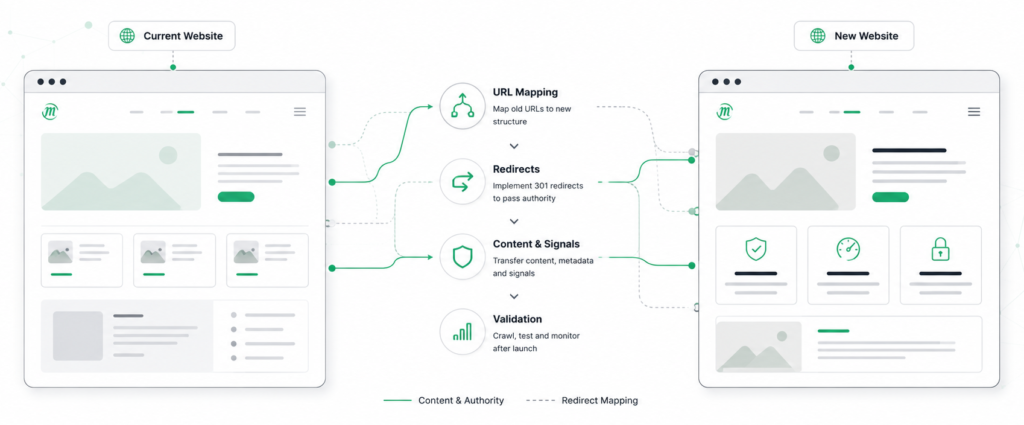

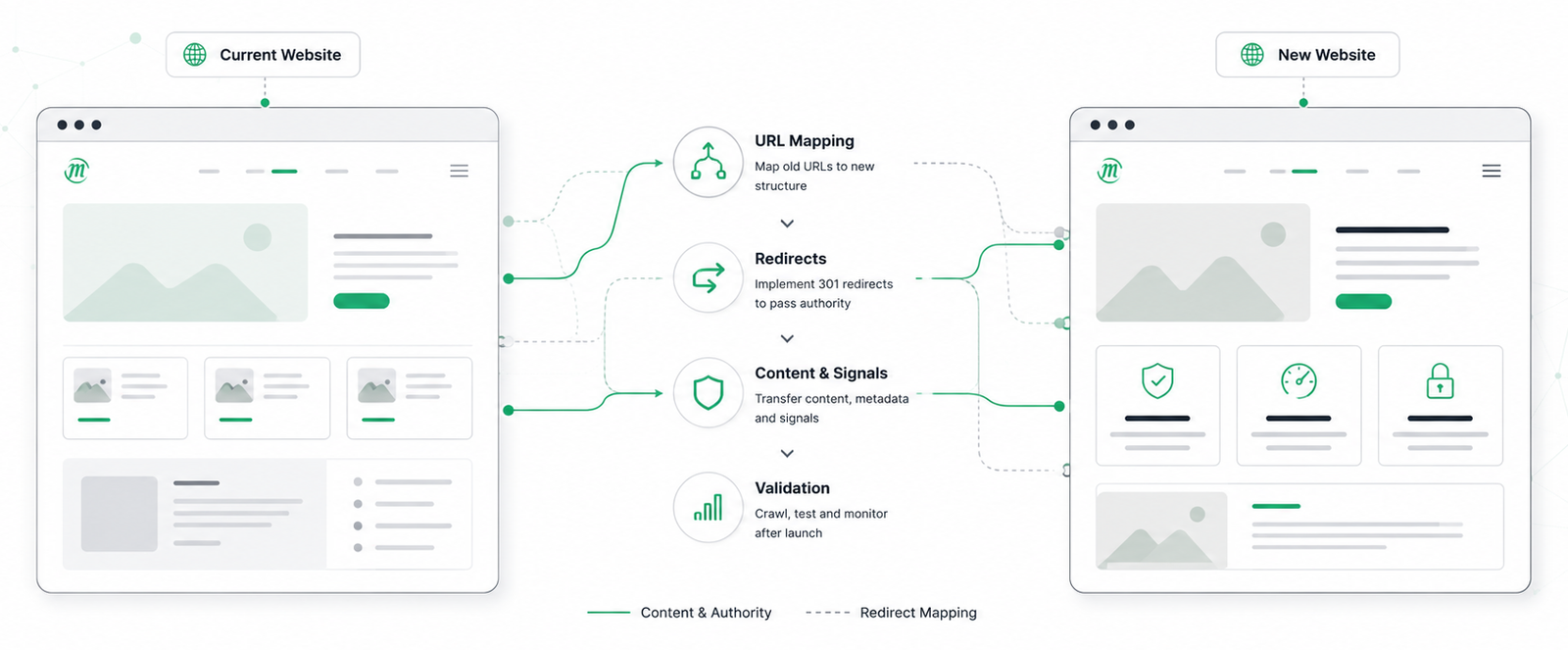
The term “website migration” covers very different projects. Moving to a new server, changing your CMS or switching domains are all migrations, but from an SEO perspective they have very little in common.
The key question is what changes from Google’s point of view.
If URLs change, they need redirects. If content or structure changes, Google has to reassess those pages. If only the underlying technology changes, Google should see almost no difference.
This article classifies website migrations by SEO risk. The more your URLs, content, structure or domain change, the more planning and technical SEO oversight the migration requires.
Not all website migrations carry the same SEO risk:
| Migration type | SEO risk | What requires the most attention |
|---|---|---|
| Hosting migration | Low | Downtime and server setup |
| CMS replatforming | Medium | Templates, rendering and internal links |
| HTTPS migration | Medium | Redirects and canonical URLs |
| URL structure changes | High | URL mapping and redirects |
| Domain migration | High | Redirects and authority transfer |
| Information architecture | High | Navigation and internal linking |
| International migration | High | Language and regional targeting |
| Combined migration | Very high | Planning, testing and phased rollout |
Understanding the most common website migration types
Hosting or server migration: the lowest risk
A hosting migration changes the infrastructure, not the website itself. The host, server or IP address changes, while the URLs, content and templates remain the same. From Google’s perspective, nothing about the site itself should change.
When rankings drop after a hosting migration, the cause is usually a configuration change rather than the hosting move itself.
Configuration errors to check on the day of the switch
The staging robots.txt sits alongside the rest of the code and can easily be deployed with it. A single Disallow rule is enough to stop Googlebot crawling the site, even though everything appears to work normally for visitors. Checking the live robots.txt immediately after the switch confirms that the correct file was deployed.
SSL certificate problems are just as easy to overlook. If the certificate covers yourdomain.com but not the www version, or was not installed correctly, browsers show a warning and Googlebot cannot access the site. Test both hostnames and both protocols to make sure every redirect path works as expected.
Response time is harder to judge, because a server can perform well during a single manual test and behave very differently under real traffic. Measure time to first byte across hundreds of URLs once the new environment is serving live requests, instead of relying on a single cached request.
The host itself is worth checking too, because a web application firewall or bot protection can classify Googlebot as unwanted traffic and serve it a block page instead of the content. A request using Google’s user agent confirms which of the two it receives.
HTTP to HTTPS migration
For most websites, HTTPS migration is already behind them.
If you are dealing with one of the remaining HTTP sites, every HTTP URL needs a 301 redirect to its HTTPS equivalent, and canonical tags must point to the HTTPS versions. The issue that usually remains afterwards is mixed content: HTTPS pages still requesting images, scripts or stylesheets over HTTP. A crawl identifies these quickly.
Everything from here on involves URLs changing, which is where the real work starts.
Domain move, rebrand, merger: where your authority moves
When a domain changes, Google has to recognise that the new URL replaces the old one. A 301 redirect is what tells Google that relationship. There is no setting that transfers rankings automatically.
Changing domains can mean three different projects, each with its own level of complexity.
Three types of domain migration
- Pure domain change. The brand stays the same, only the domain changes, for example from yourbrand.de to yourbrand.com. Every old URL should return a 301 to its exact equivalent on the new domain, and the redirect map should cover every indexed URL.
- Rebrand. Both the brand name and the domain change. The redirects transfer Google’s understanding of the URLs, but they do not explain the name change itself. Search engines learn the relationship through the redirects, while LLMs may continue associating the old and new brands separately for some time, as explained later in this article.
- Merger. Two or more domains become one. Where both sites cover the same topic, one URL has to become the canonical destination. Leaving multiple versions live simply creates unnecessary competition.
Splitting one website into several is the same challenge in reverse and is covered later under site splits.
Redirecting everything to the homepage does not work
If an old product page redirects to the homepage instead of its replacement, Google will often treat it as a soft 404. The original page drops from the index and little or no value is transferred.
This often goes unnoticed because the redirect appears to work for users. The problem only becomes visible after Google recrawls the old URLs, when Search Console starts reporting Soft 404 and Page with redirect.
Every URL therefore needs its own destination: the page that actually replaces it. If no suitable replacement exists, a redirect is often the wrong solution, which leads into the next section.
Use the Change of Address tool for full domain moves
For a full domain migration, Google Search Console provides a Change of Address tool, which should only be used once your 301 redirects are live and working correctly. It tells Google that the move is intentional, but it does not create redirects or transfer rankings on its own.
Google has tightened the requirements here. When you move to a new domain, the change should be submitted for every subdomain variant of the old domain, including www and non-www, and each of those variants has to be verified in Search Console beforehand, even if you are not actively using them.
Keep the old Search Console property after launch. It lets you monitor how Google recrawls the old URLs, identify unexpected status codes and follow the migration while Google processes the redirects. Some ranking fluctuation during this period is normal.
The tool only applies to domain-level moves. It is not used for HTTP to HTTPS migrations, switching between www and non-www within the same domain, URL structure changes on the same domain, or hosting migrations. Those rely on correct redirects, canonical signals where appropriate, updated sitemaps and Google’s normal crawling process.
Changing URL structure: where migration often fails
The domain stays the same, but the URLs change. From an SEO perspective, this is the same challenge as a domain migration: every changed URL needs a planned destination and the correct HTTP response after launch.
URL mapping
Defines what should happen to every important URL during the migration.
Live server response
The redirect configuration turns the mapping decisions into actual HTTP responses.
Every URL needs a defined HTTP response
Every existing URL should have a decision before development begins. It either stays, moves to a replacement or is intentionally removed. Those decisions become the URL mapping that developers implement during the migration.
After launch, each URL should return the response that matches its decision:
- 200 : the page remains unchanged.
- 301 : the content has moved permanently.
- 410 : the content has been intentionally removed.
- 404 : the page cannot be found, without explicitly signalling permanent removal.
Most URLs will return a 301. The exceptions are where the real decisions are made. A discontinued product with no replacement, an expired campaign or a page deliberately removed should normally return 410. Redirecting these pages to a loosely related category often results in a soft 404 instead, wasting crawl budget without preserving relevance.
The URLs that cause problems are usually the ones nobody planned for. They return unexpected 404 responses after launch and often remain unnoticed until Google reports them in Search Console weeks later.
Four common URL change patterns
- Planned restructuring. New permalinks, new directories, or a blog moving from blog.yoursite.com to yoursite.com/blog. As long as every old URL has a mapped destination before launch, this is a straightforward migration.
- Delete and recreate. A page is removed, then published again under a new URL without a 301. Google treats the new URL as a completely new page even though the content is identical, and the ranking signals attached to the old URL are lost.
- Ad hoc changes. Someone changes a URL without updating the redirect mapping, and a few months later nobody knows which URL replaced which page. Make it a team rule: every URL change requires a redirect and an entry in the URL mapping before it goes live.
- Parallel URLs. The old URL remains live, so both /services and /solutions return 200 with the same content. Google may index both and rank either one. A 301 redirect settles it. Canonical tags are only a hint, and belong to the case where both URLs genuinely need to stay accessible.
Check for redirect chains and temporary redirects
If /shop/product-a redirects to /products/product-a, which then redirects to /p/product-a, Googlebot has to make three requests before reaching the final page.
Google has confirmed that PageRank is not lost across 3xx redirects, so the old link equity argument no longer applies, but that does not make chains harmless. They slow down crawling, consume crawl budget for nothing and create additional points of failure as redirect rules evolve over time.
Check the status codes at the same time. A 302 tells Google the move is temporary, so the old URL may remain indexed instead of being consolidated with the new one. Many content management systems, plugins and frameworks create 302 redirects by default, so always verify that permanent URL changes return a 301.
Platform or CMS switch (replatforming): nothing works without a complete URL mapping
A replatforming combines several migration types at once: new URL patterns, different templates, changes to the internal linking structure. In some cases the rendering changes as well, and content that was previously delivered in the HTML is now rendered with JavaScript.
Sampling a handful of pages is not enough. Every existing URL needs to be accounted for before the migration.
Export the URL inventory before development starts
Create the URL inventory while the old website is still live. Once it has been replaced, recovering the full URL set becomes difficult and usually incomplete.
No single source contains every URL, so combine multiple datasets:
- A crawl of the live site captures everything that is internally linked.
- XML sitemaps, including any the CMS generates automatically, often contain URLs the crawler never reaches.
- The Search Console Pages report adds URLs that still receive impressions or clicks.
- Server logs reveal what users and search engines are still requesting, which usually means external links continue to point there.
After removing duplicates, every URL in the inventory should have a defined outcome: remain live, redirect to a replacement, or return the appropriate status code.
Test the redirects before the DNS switch
Redirects should be tested before the DNS change. Once the new site is live, every incorrect redirect affects users and crawlers immediately.
Point a crawler at the staging environment and use the old URL inventory as the starting list. This identifies URLs returning 404, redirects landing on the homepage, redirect chains, and any 302 responses that should be 301.
The second check compares the two websites rather than individual URLs: title tags, H1 headings, word count, canonical tags and internal links per URL, old crawl against new. Pages that launch with noticeably less content or fewer internal links have lost the elements they previously ranked with, and that is far easier to correct before launch than after.
Keep the old XML sitemap and submit it once the new site is live. It gives Googlebot the exact list of URLs to recrawl, which speeds up the discovery of your 301 redirects.
Product, category and filter URLs in e-commerce
In e-commerce, product, category and filter URLs are affected in large numbers. Parameter URLs such as /shoes?colour=black&size=42 rarely map one to one onto the new system’s parameter handling.
Discontinued products account for most of the volume. Each one needs a decision, but not an individual one: redirect to the successor product where one exists, redirect to the parent category where the product line remains, and return 410 for the rest. Defined as rules that run against the product database, those three cases cover the entire catalogue. Handled manually, they become a spreadsheet with one row per discontinued product.
Design relaunch: "just" visual is a fallacy
A redesign appears to change only the presentation. In practice it changes the HTML, and the HTML is what Google reads. The difference shows up in how pages are linked, how they are structured and how much text they carry.
Navigation menus, sidebars and related-content blocks are often rebuilt or removed during a redesign. Pages that previously received dozens of internal links may end up with only a handful. The heading hierarchy changes as well, typically when the page title becomes a styled div and the former H2 headings collapse into a single level.
Then there is the copy. Long explanatory sections rarely fit a tighter layout, so they are shortened during the design phase and the page loses the terms it ranked for. That decision is made in the design review, not in development.
The same crawl comparison used for a replatforming applies here. Comparing word count and internal links per URL, old against new, identifies the pages that launch with less than they had.
Content and structure migration: changing relevance directly
This is where you intentionally change what pages say and how they connect to one another.
- Three thin service pages become one, with 301 redirects from the two pages that are removed.
- Overlapping guides are merged so they no longer compete for the same search queries.
- Pages that never generated meaningful traffic are removed, with each one returning either a 301 or a 410.
- The navigation is reorganised, changing the internal links that help Google understand which pages are most important.
Planned carefully, this is one of the few migration types that can improve rankings rather than simply preserve them. Without that planning, pages that were generating traffic disappear and take their rankings with them.
These decisions should be based on search data rather than assumptions. A page that looks thin in the CMS may still attract valuable long-tail traffic. Search Console reveals that; the CMS does not.
Site merge and site split: multiple migrations in one project
In acquisitions or restructurings, several websites are merged into one, or a single website is split into several. This combines a domain migration, a URL migration and a content migration in the same project, together with a decision about which page should become the authoritative version whenever two sites cover the same topic.
The biggest challenge is usually not technical. It is agreeing which page should survive when multiple teams believe theirs is the better choice.
Internationalisation: adding languages and countries
International websites introduce two separate decisions: how each market is structured, and how language and regional versions are connected.
Directory, subdomain or country-code domain?
- Directories, for example yoursite.com/de-at/, keep everything on one domain, allowing authority to be consolidated.
- Subdomains, for example at.yoursite.com, separate markets while remaining part of the same website.
- Country-code domains, for example yoursite.at, provide the clearest geographic signal, but each domain has to build its own authority.
The structure matters less than the consistency. Pick the one that fits how the business is actually organised, then apply it everywhere.
Validate hreflang
hreflang tells Google which language or regional version of a page should be shown to users. Every version must reference every other version, including itself.
When hreflang is incorrect, nothing visibly breaks. Pages remain indexed, but Google may serve the wrong language or regional version in search results. These issues often become apparent only when Search Console or analytics no longer match the country and language structure you intended.
Because these errors are difficult to spot manually, validate hreflang with a crawler that checks reciprocal annotations across the entire site. A single missing return reference is enough to break the relationship.
The highest-risk migration: changing everything at once
A new domain, a new CMS platform, a new design and a new URL structure all launched at the same time combine the risks of every migration type.
The risk itself is not the worst part. If traffic drops afterwards, you cannot tell which change caused it, because everything changed on the same day.
Where possible, split major changes into phases. Migrate to the new platform first, then introduce the redesign once rankings have stabilised. It requires another deployment and another round of testing, but it makes it far easier to isolate and resolve any ranking changes.
Why this distinction matters
Most ranking losses after a migration are not caused by a Google penalty. They happen because the wrong safeguards were applied to the wrong type of migration.
- A hosting migration needs a deployment checklist: robots.txt, SSL certificates, response times and firewall rules.
- A domain migration needs a complete URL mapping implemented with 301 redirects.
- A URL structure migration needs both a URL mapping and a content mapping.
Using the right checklist for the wrong migration leaves the real risks uncovered.
Which is why the baseline comes first, whatever type of migration you are planning. Export Search Console performance data, save a crawl of the existing website and record your most important landing pages in analytics. Without that reference point, you can see that traffic has changed after launch, but not which URLs or queries were affected.
Website migrations from an AI search perspective
Search engines are no longer the only systems that need to understand a website migration. ChatGPT, Perplexity and Google AI Overviews increasingly influence how people discover brands, and they do not all respond to migrations in the same way.
Live retrieval and training data
Large language models generate answers in two different ways, and a migration reaches them at different speeds.
Sometimes the model runs a search while it generates the response. Google AI Overviews rely on Google’s search index, while ChatGPT Search primarily uses Bing together with OpenAI’s own retrieval systems. Here, migrations behave much like they do in traditional search: once 301 redirects are live and the new URLs have been crawled, retrieval systems begin using the new addresses.
In many cases, though, no search takes place at all. The model answers from information learned during training, long before the request was made. Recent clickstream research from Semrush suggests that a large proportion of AI responses are generated this way, without triggering a live search.
A 301 does not update training data
A 301 redirect changes where crawlers are sent. It does not change information already stored in a model.
That is why a successful domain migration can still result in ChatGPT mentioning the old domain months later, even though Google has fully processed the redirects. The old domain disappears only as new models are trained on a web that consistently references the new brand and domain.
The only way to monitor it is to ask AI systems about your brand and its core topics, repeatedly, over a period of months. Search Console cannot show how AI models identify your business.
A University of Toronto study found that an average of 16 percent of the entities named in generated answers did not appear in any retrieved document, and that changing the retrieved sources barely changed the output.
Rebrands depend on more than redirects
For AI systems, the important signal is not the URL but the brand name.
A 301 redirect tells a crawler that one page replaced another. It does not tell a language model that one company name replaced another.
A model rebuilds that association only as the new brand name appears consistently across websites, directories, review platforms, industry associations and media coverage. Research by Ahrefs across 75,000 brands found branded web mentions correlating with AI Overview visibility at 0.664, against 0.218 for backlinks, and a follow-up study found the same pattern across ChatGPT and Google AI Mode. Ahrefs note themselves that this is correlation rather than proof of causation.
In practice, updating third-party mentions becomes part of the migration project, not something to deal with afterwards.
AI citations and Google rankings are different signals
Ranking well in Google does not automatically mean being cited by AI systems.
The same University of Toronto research found little overlap between Google’s top-ranking pages and the sources cited by AI systems. For GPT-4o the median overlap was zero, meaning that on more than half the tested queries it cited nothing from Google’s top ten.
Treat search visibility and AI visibility as separate measurements.
What a successful migration looks like today
A successful migration now has two outcomes.
The first is technical. Google receives the correct redirects, status codes and internal signals, allowing rankings to transfer as expected.
The second is brand recognition. AI systems gradually learn the new domain and, if applicable, the new company name, as references across the web are updated and future model training incorporates them.
Keeping your search rankings is no longer the entire goal. A few months after launch, your new brand and domain should be recognised consistently by both search engines and AI systems. Redirects secure the first. Only planning secures the second.
Is Your Tech SEO Foundation Migration-Ready?
Planning a migration or auditing your current setup? We map your visibility baseline
Read Our Latest Articles
Lorem ipsum purus eu id enim sit rhoncus ut eu dapibus neque eu ipsum mauris rhoncus lorem iaculis varius non arcu lectus potenti felis ac arcu ac porttitor feugiat sed velit felis sed tortor faucibus semper quis leo in dictumst malesuada lacinia urna nulla vitae ornare scelerisque